Managing Context: Reducing Hallucinations and Run Costs
Long sessions fill the context window, burying your instructions under noise. The model forgets your conventions, hallucinates file contents, and every reply costs more.
What is Context?
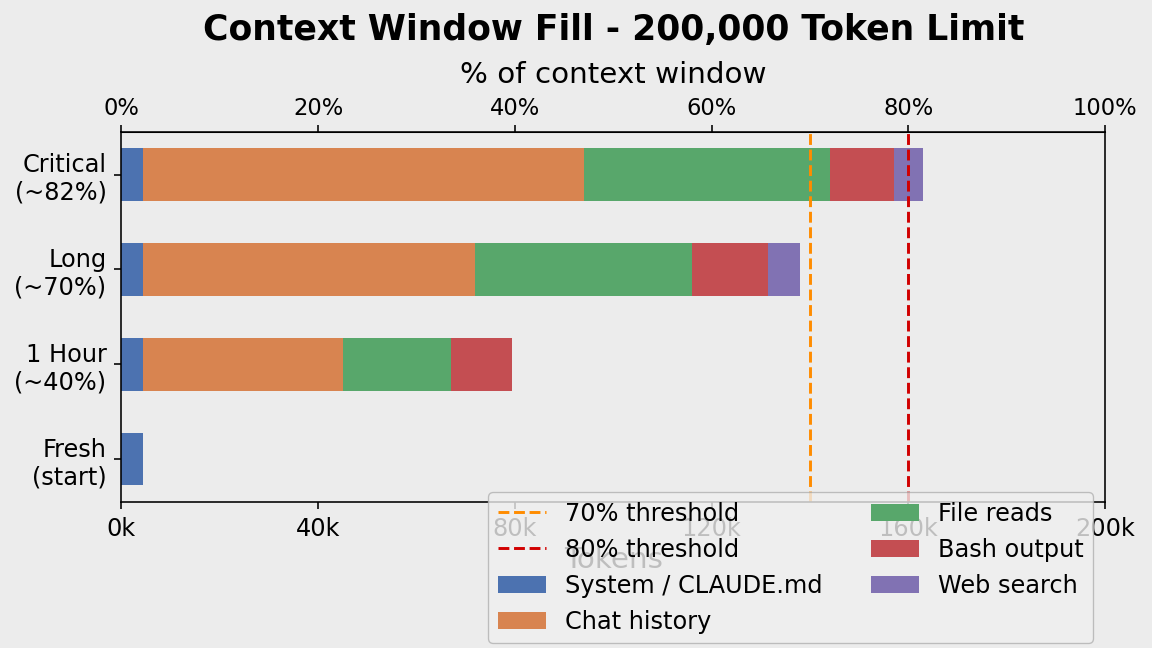
Every message re-sends the entire conversation to the API — your rules, all previous messages, every tool output. This bundle is the context window, measured in tokens (~0.75 words each). All Claude models support 200,000 tokens (~1,500 pages).
What fills it:
- System prompt / CLAUDE.md — fixed overhead every session
- Chat history — grows ~1k tokens per turn
- File reads — one 500-line file ≈ 3k tokens
- Bash/test output — a single stack trace ≈ 5k–20k tokens ← silent killer
- Web search results — 5k–10k per search
Context Rot and Cost
Context rot happens past ~70%: early instructions get buried, the model attends to recent noise over old rules, hallucinations increase.
Cost scales linearly — every message re-sends the full window. 50 messages at 150k tokens on Sonnet = $22.50 in input costs alone.
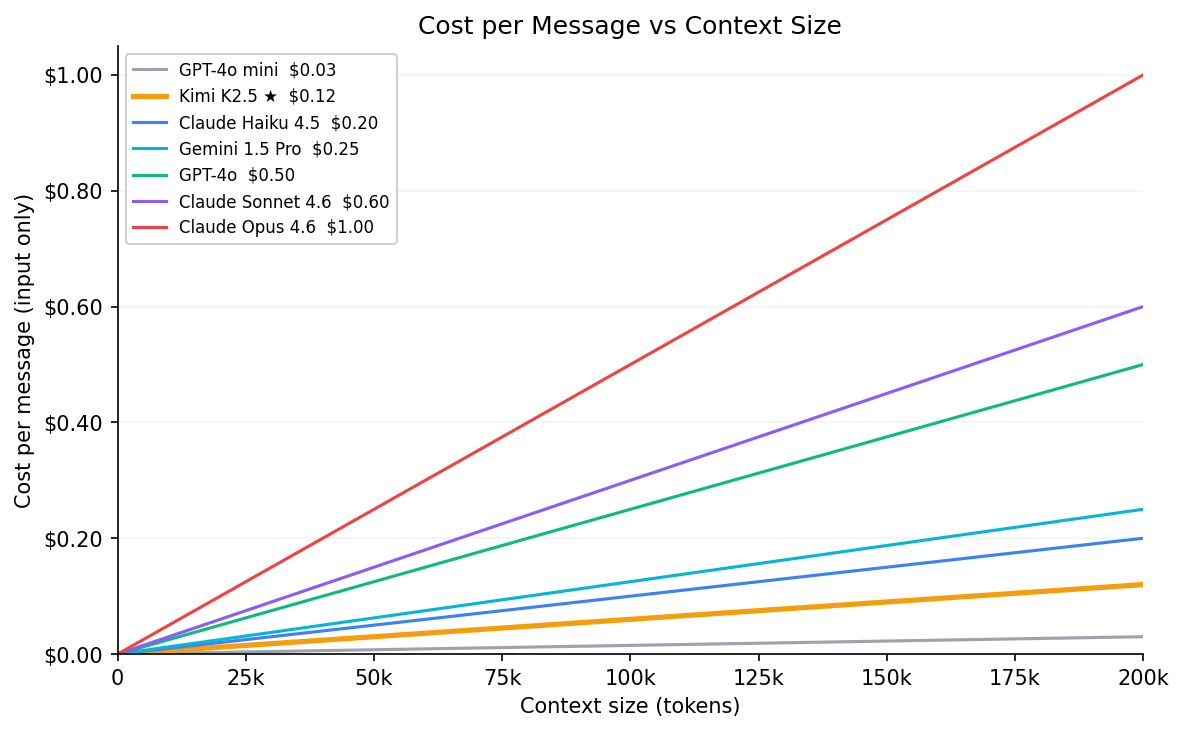
| Model | $/MTok input | Context window | @ 50k | @ 150k | @ max |
|---|---|---|---|---|---|
| GPT-4o mini | $0.15 | 128k | $0.01 | $0.02 | $0.02 |
| Kimi K2.5 ★ | $0.60 | 256k | $0.03 | $0.09 | $0.15 |
| Claude Haiku 4.5 | $1.00 | 200k | $0.05 | $0.15 | $0.20 |
| Gemini 1.5 Pro | $1.25 | 2M | $0.06 | $0.19 | $2.50 |
| GPT-4o | $2.50 | 128k | $0.13 | $0.38 | $0.32 |
| Claude Sonnet 4.6 | $3.00 | 200k | $0.15 | $0.45 | $0.60 |
| Claude Opus 4.6 | $5.00 | 200k | $0.25 | $0.75 | $1.00 |
★ Kimi K2.5 is the model used in this course (via OpenRouter). Even so, 50 messages × 150k tokens = $4.50. Context management is a billing issue, not just a quality issue.
For up-to-date pricing and context window specs across all models, see models.dev.
Check your context at any time with /context. Here’s real output from the session used to write this tutorial (reading files, running web searches, generating charts):
❯ /context

  Context Usage
  claude-sonnet-4-6 · 56k/200k tokens (28%)

  Estimated usage by category
  System prompt:   3.5k tokens  (1.7%)
  System tools:     21k tokens (10.5%)
  MCP tools:       4.7k tokens  (2.3%)
  Skills:           <1k tokens  (0.0%)
  Messages:        28.2k tokens (14.1%)
  Compact buffer:    3k tokens  (1.5%)
  ─────────────────────────────────────
  Free space:       140k tokens (69.8%)
A few things stand out here: system tools (10.5%) — Claude Code’s built-in tool definitions are re-sent every message even when unused. MCP tools add another 2.3% just for being registered, regardless of use. Both are fixed overhead you can’t compress away — only /compact or a fresh session resets them.
The Solutions: /clear and /compact
/clear resets the conversation entirely — zero history, zero tool outputs, back to just the system prompt. Use it between unrelated tasks or when the session has gone off track. It’s instant and free.
/compact summarises the entire conversation into a structured digest (~5k tokens) and discards the raw history — typically a 97% reduction. Unlike /clear it preserves continuity: decisions, file states, and completed work survive in the summary. Use it when you want to keep going on the same task with a lighter context.
/clear |
/compact |
|
|---|---|---|
| History after | Gone | Summarised (~5k tokens) |
| When to use | Between tasks, fresh start | Mid-task, keep continuity |
| Cost | Free | One summary call |
Auto-compact warning: The automatic trigger at 80% only saves titles and brief excerpts — not full content. Don’t rely on it. Use
/compactmanually.
Further Reading
- GSD and the Ralph Loop — atomic tasks, PLAN.md handoff, and automation scripts
- Anthropic: Building Effective Agents